









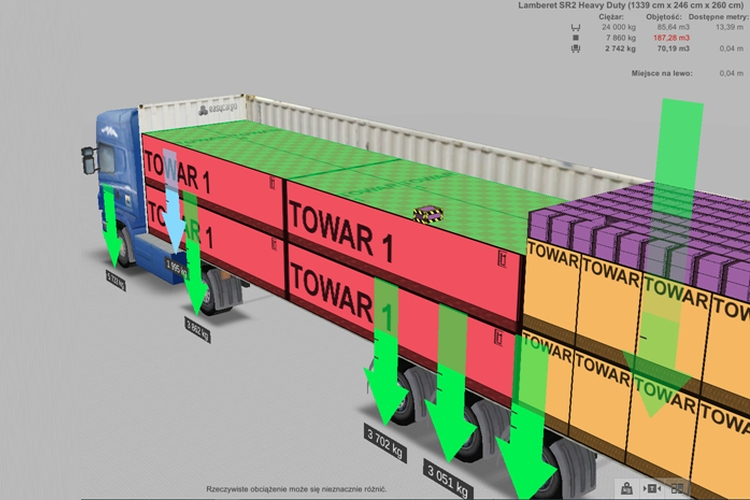
EasyCargo is a load planning software that allows you to optimize cargo distribution and visualize it in a selected cargo space as a 3D model. In this article, we present its functionality and the benefits associated with its implementation.
A wide selection of cargo spaces
At the moment, the program’s catalog contains 40 predefined cargo spaces. These are the most common settings, but this list is constantly updated and expanded. In practice, it turns out that “as many users, as many cargo spaces,” so the software manufacturer has also included the ability to design your own cargo space. Registration for the application is free and allows for a 10-day free access to EasyCargo to test all the program’s features.
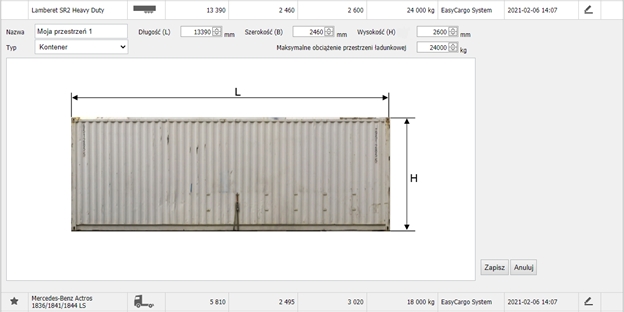
Several types of spaces are available, including semi-trailers, trailers, trucks, and containers. The internal length, width, and height, maximum load, and in some cases, axle load, can be freely adjusted to your own needs.
Cargo spaces in action
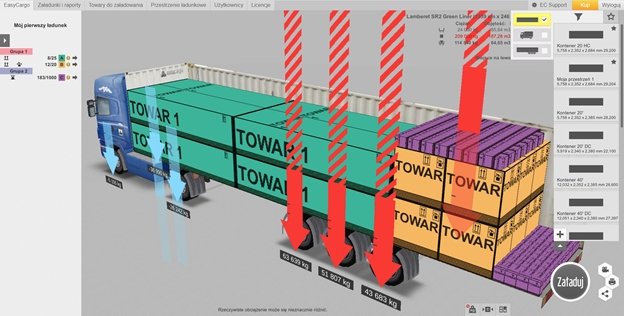
To improve work with spaces, the manufacturer has enabled two operations for them: adding selected spaces to a favorites collection and filtering them. The most frequently used spaces can always be kept in sight by clicking the star symbol next to them. This can be done from the Loadings and reports tab or the start screen (see below). Filtering allows you to display only those types of spaces that are most interesting to the person operating the program. You can learn more about this in the article on the manufacturer’s website.
Load planning for multiple cargo spaces
Definitely one of the most desired features that load planning software can offer is the distribution of cargo into several spaces. In EasyCargo, this option is not explicitly available – however, there is a series of steps that, when performed sequentially, yield the desired result. At this link, you will find instructions on how to do this.
In case of doubts, questions, or suggestions regarding the improvement of the EasyCargo program, you can contact the manufacturer via email: wsparcie@easycargo3d.com.
Read more about EasyCargo:
– Optimizing truck and container loading using EasyCargo software
– News in cargo spaces