








Using modern demand forecasting and inventory management techniques to optimize the supply chain using the example of fuel distribution – part 2
Article distinguished in the 4th edition of the “Logistics Pen” competition.
Article distinguished in the 4th edition of the “Logistics Pen” competition.
3.2. Implementation in Excel (VBA for Application)
The case study in Excel has been described in 9 steps.
Step 1.
This step presents the initial data sheet. The table on the left side of the sheet was developed based on the company’s historical data. The demand volumes and the probabilities of each occurring were determined using the method of tabular fitting of an empirical distribution to a theoretical one.
In the upper left corner of the sheet, the RAND function was entered. This is a function defined by the sheet that generates pseudorandom numbers according to a uniform distribution in the interval (0, 1).
The table on the right side of the sheet generates demand for the studied period. It is activated by a button named “generate demand”.
This step presents the initial data sheet. The table on the left side of the sheet was developed based on the company’s historical data. The demand volumes and the probabilities of each occurring were determined using the method of tabular fitting of an empirical distribution to a theoretical one.
In the upper left corner of the sheet, the RAND function was entered. This is a function defined by the sheet that generates pseudorandom numbers according to a uniform distribution in the interval (0, 1).
The table on the right side of the sheet generates demand for the studied period. It is activated by a button named “generate demand”.
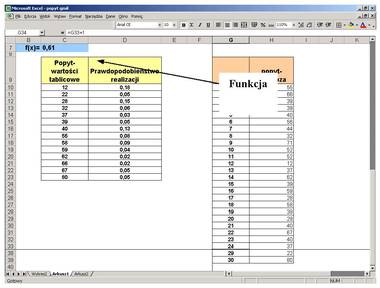
Fig. 1. Sheet generating demand based on the probability distribution of demand and a pseudorandom number (own elaboration).
Step 2.
This step presents the procedures generating demand. They are developed in the Visual Basic editor. The codes of the procedures: function and sub are presented (Fig. 2).
This step presents the procedures generating demand. They are developed in the Visual Basic editor. The codes of the procedures: function and sub are presented (Fig. 2).
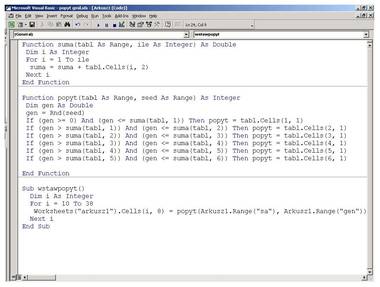
Fig. 2. Procedures generating demand (own elaboration).
Step 3.
In this step, after creating the button launching the “demand generator”, one can proceed to generate demand volumes in the considered period. Each activation of the “generate demand” button allows for analyzing various scenarios (data sets) and demand variability on a chart, thanks to which one can compare forecasts developed independently, e.g., by the supplier and the manufacturer (Fig. 3).
In this step, after creating the button launching the “demand generator”, one can proceed to generate demand volumes in the considered period. Each activation of the “generate demand” button allows for analyzing various scenarios (data sets) and demand variability on a chart, thanks to which one can compare forecasts developed independently, e.g., by the supplier and the manufacturer (Fig. 3).
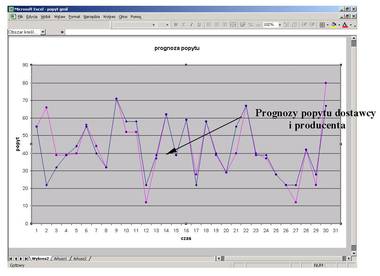
Fig. 3. Graphical analysis of demand variability (own elaboration).
Step 4.
The generated demand, along with agreements, allows for creating an optimal delivery schedule for diesel oil and motor gasoline. Figure 4 presents the application “menu”. Buttons developed as a macro or in Visual Basic for Application open sheets related to subsequent analysis procedures.
The generated demand, along with agreements, allows for creating an optimal delivery schedule for diesel oil and motor gasoline. Figure 4 presents the application “menu”. Buttons developed as a macro or in Visual Basic for Application open sheets related to subsequent analysis procedures.
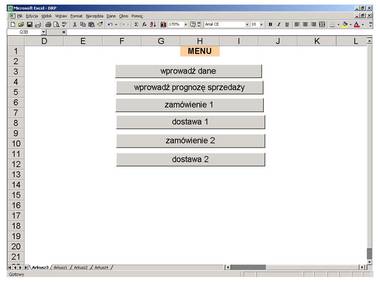
Fig. 4. Menu of the application related to distribution resource planning (own elaboration).
Step 5.
The “enter data” button launches the sheet related to initial data (Fig. 5).
The “enter data” button launches the sheet related to initial data (Fig. 5).
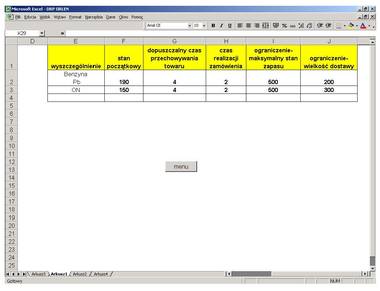
Fig. 5. Data table for the optimal liquid fuel delivery schedule algorithm (own elaboration).
Figure 5 presents a table that reflects information regarding the initial state of warehouse stock, order lead time, and constraints related to:
- permissible storage time of goods in the warehouse,
- maximum warehouse stock level,
- delivery size.